
This is a screen shot of my Linux desktop. As I've mentioned in earlier posts, most Linux distributions use the
KDE desktop. it's
pretty much the standard Linux desktop GUI (Gnome is a close second). And the Linux distributions I run use the the
KDE desktop.
KDE stands for
Kool Desktop Environment. Some say the "K" in
KDE doesn't stand for anything. But, for me, it stands for "
Kool" because it really is cool! And the advantage it has over Windows is that the user can customize his/her desktop in an infinite number of ways.
If you take a good look at the screen shot, you'll see that I have toolbars on the top and bottom of the desktop. I have a couple of
SuperKaramba widgets running, as well. One widgets displays local weather conditions and forecast and the other widget is a quick search bar for
Wikipedia.
I also have a
THIRD toolbar (in
Linuxland we call them
"panels"), sitting atop the bottom toolbar (panel). This third panel displays a ticker which updates the latest Linux news headlines. the second half of this panel is a dictionary.
I can hide these panels at anytime simply by clicking on the arrows at the right or left I can also drag these panels to any edge of the screen.
All this is incredibly easy to do! The best way to see this customization is action is to simply
GET LINUX!Download any of the distributions, bun to CD-ROM, and run it as a Live CD. You can then experiment with how easy it is to customize your
KDE desktop.
Believe me, you'll be
amazed at how much you can personalize your desktop compared to Windows.
When it comes to customizing, hands down, Linux wins!
(By the way, did you notice from my desktop that I'm running a couple of Windows applications in Linux? That's thanks to WINE! More on that in later posts! Stay tuned!)Got a question about cartooning with Linux, or Linux in general? Email me at: georgetoon@gmail.com. If I use your question on my blog, I'll send you an original, signed George comic strip!

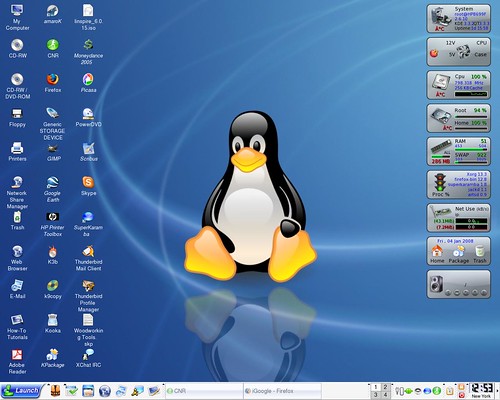 Gary from the Freespire Forums sends along this screen shot of his Linspire Linux desktop. He's running SuperKramaba using the crystal monitor widget.


